
Patok Office · for the plant office
The line stopped six hours over a piece of paper.
The material was already at the plant. One certificate was missing and nobody knew who had it. Your office has WIP too: orders, purchases, receipts, shipments and invoices waiting on one piece of data. Nobody counts it, so chasing it falls on you.
What happens today
- 01 The paperwork gets stuck and the line stops.
- 02 You spend your day chasing information, and the business rides on you never slipping.
- 03 It is not fair that a company that produces well loses money over an e-mail nobody sent.
The map
A value stream map of the office.
What you would draw on the floor, drawn for the paperwork: three chains, six stations, and at each station what gets measured. It is not an org chart or a process diagram. It is where the work is right now.
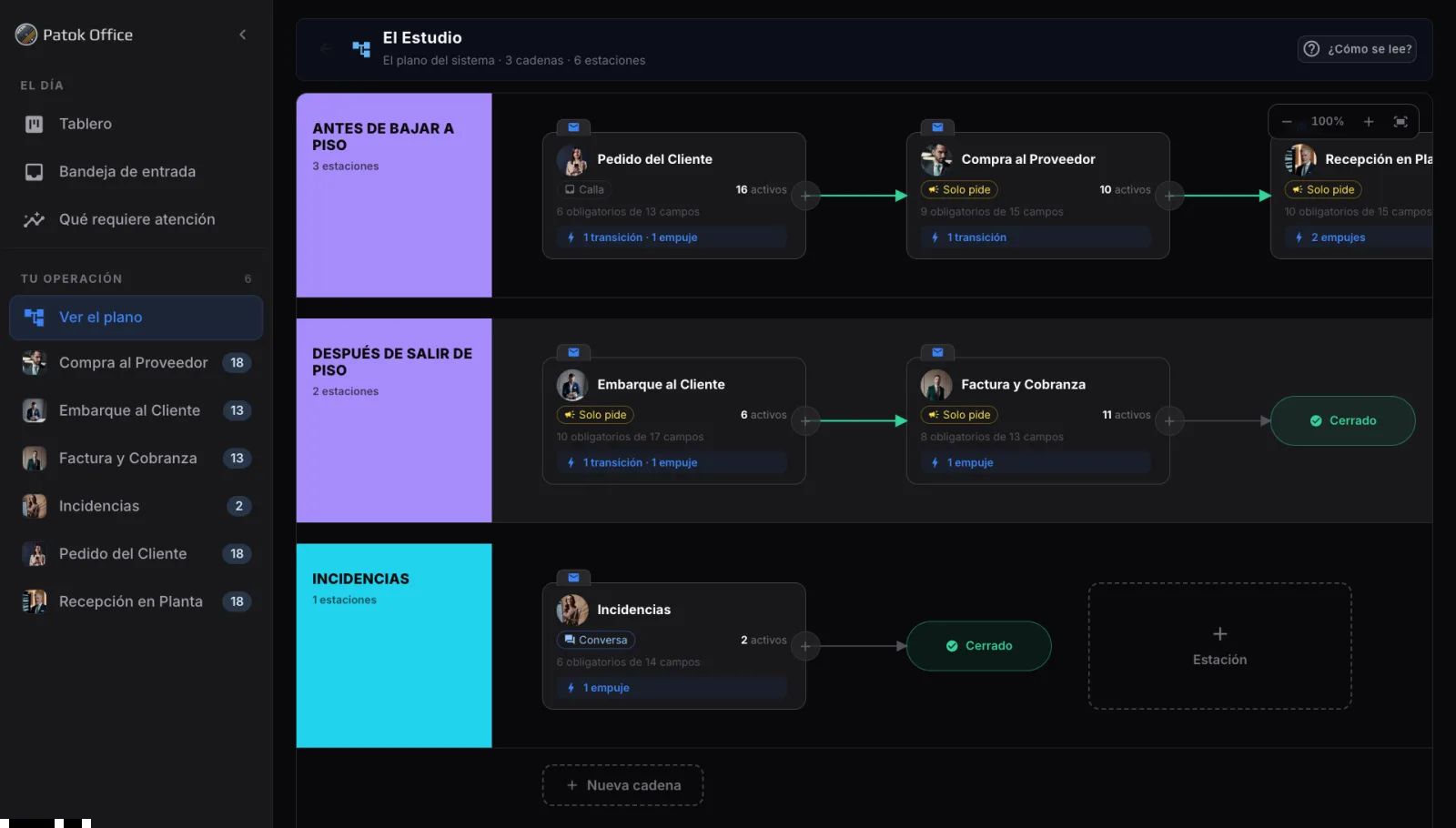
- 01 Three chains Before going down to the floor: order, purchase, receiving. After leaving the floor: shipment, invoice and collections. And incidents, which open at any point.
- 02 Active = WIP 16 orders, 10 purchases, 6 shipments, 11 invoices, 2 incidents. Case files open right now, counted per station.
- 03 Completeness "6 required of 13 fields". The station does not close because somebody clicks: it closes when the data is there.
- 04 Transitions and pushes "1 transition · 1 push". What is born when it closes, and who gets written to without anyone drafting.
- 05 The voice Stays quiet, Only asks, or Converses. Each station has its own.
If you have drawn a VSM on the plant floor, you already know how to read it. Get the map as a PDF →
WIP, counted
Each station tells you how many case files it holds, which ones are incomplete and which data is missing.
On the floor you count parts in front of the machine. Here you count case files in front of the station. Same question: why is it not moving?
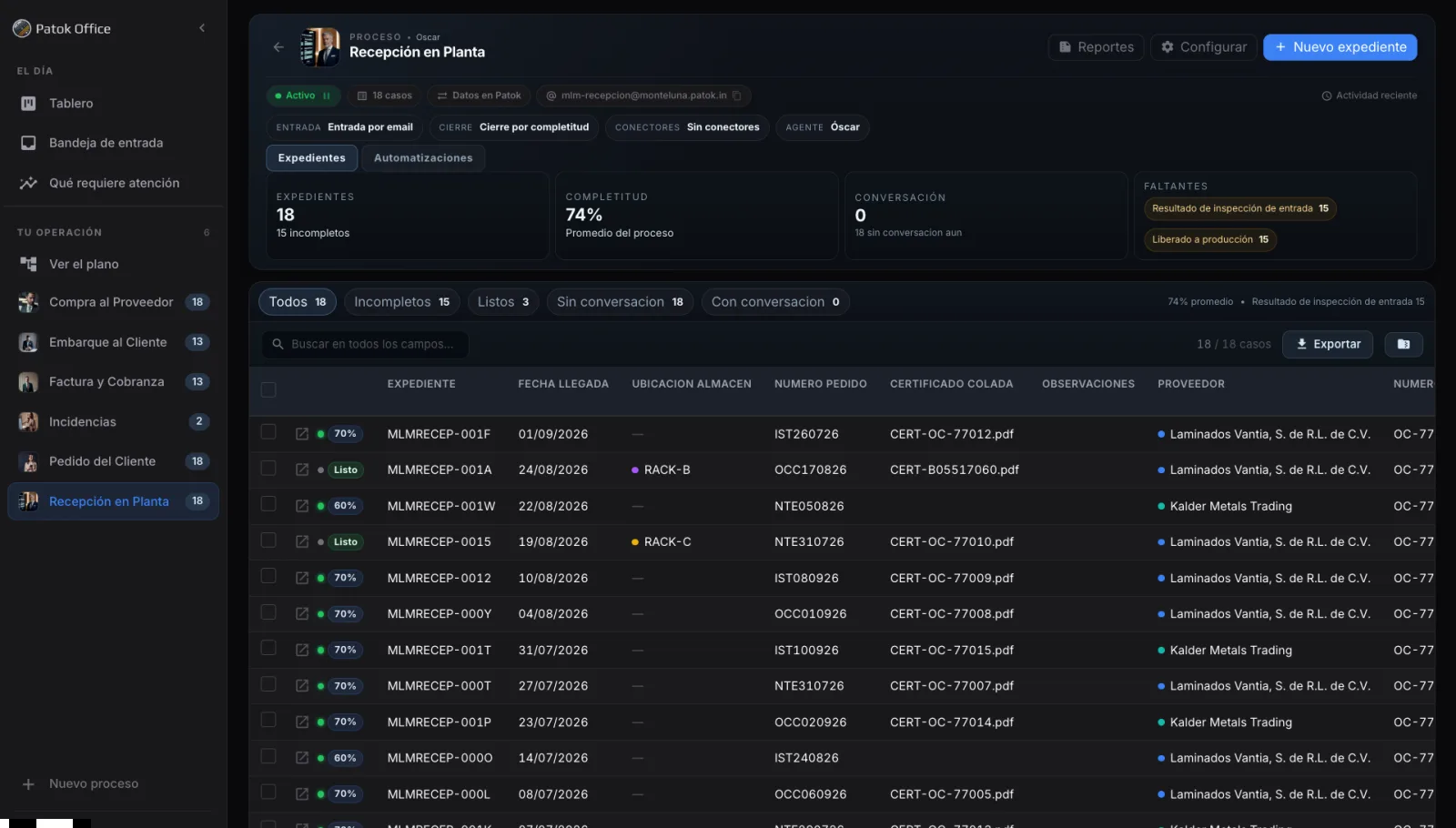
Missing, by name
Fifteen receipts waiting on the same piece of data are not fifteen problems. They are one station's problem. You can only see it if you count.
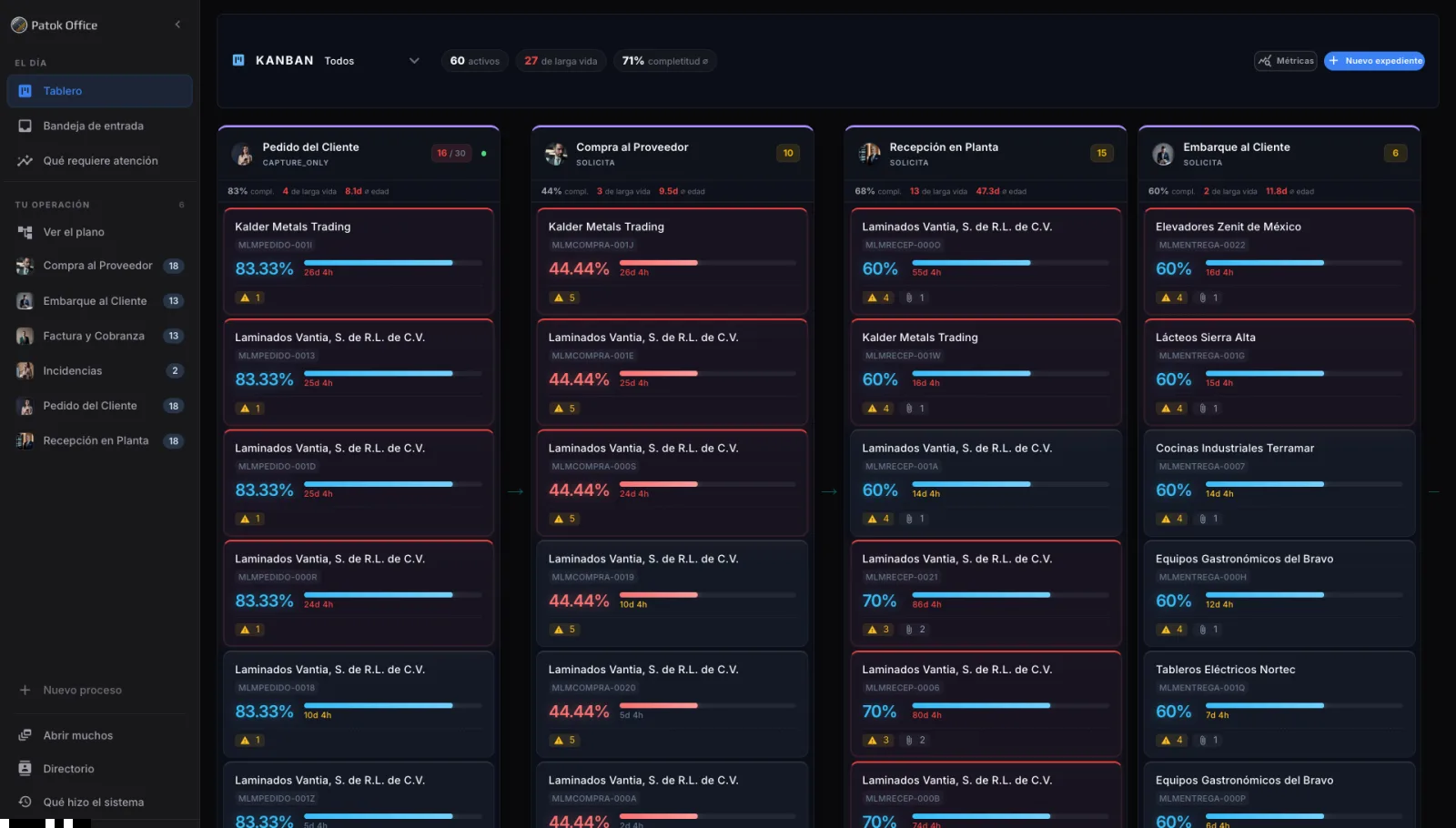
The map, on one page
Get the map
The three chains, the six stations and what gets measured at each one. As a PDF, to your inbox.
Done. The map is already on its way. Look for it in your inbox: it comes from me, Horacio. After that, the Office tutorials as they come out.
The case file
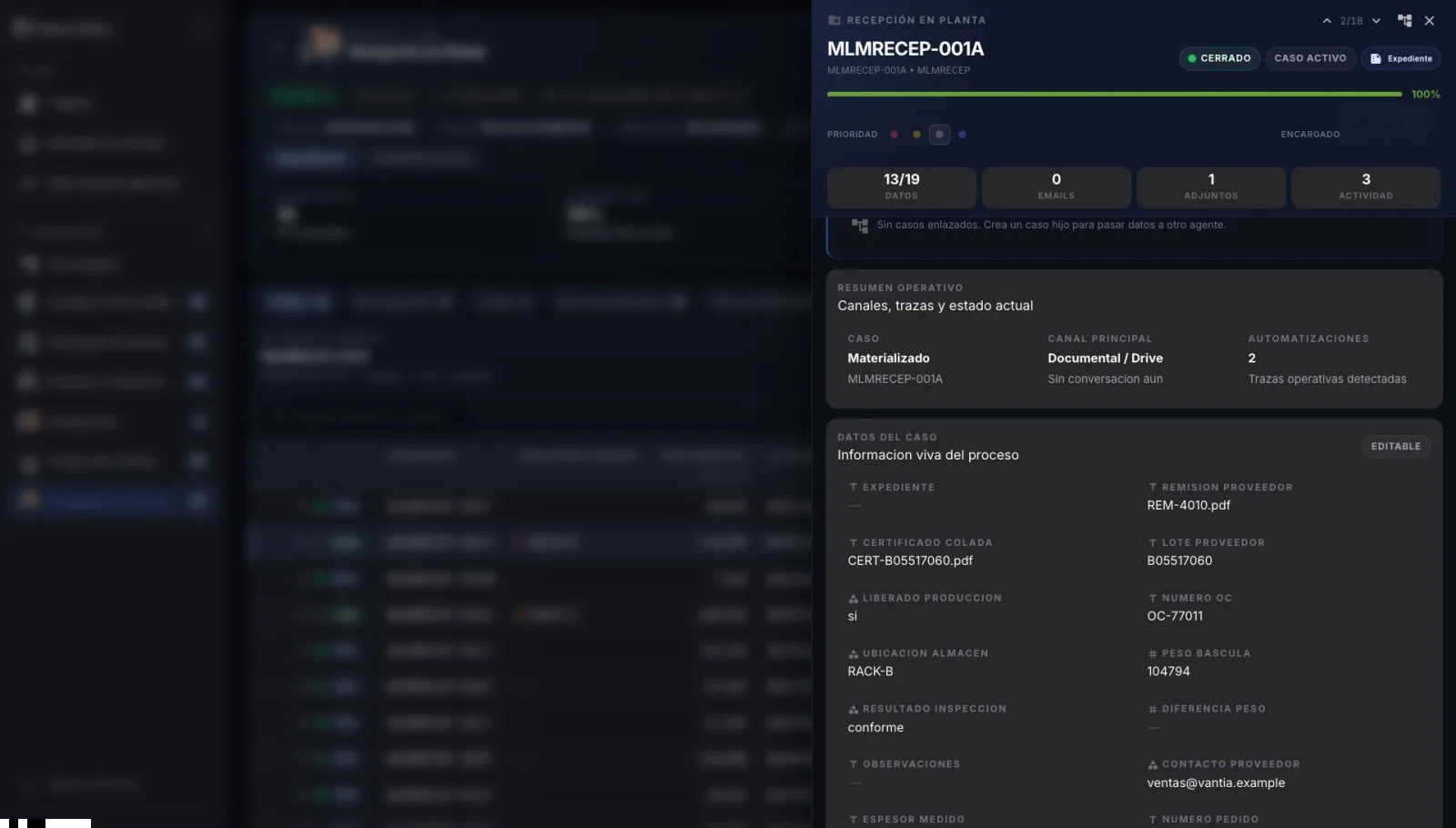
A pending item with an owner, a deadline and the live data of the process.
The unit of work in the office. It is not an e-mail or a task: it is the order, the receipt or the invoice while something is still missing.
The case data
Supplier delivery note, heat certificate, lot, purchase order, warehouse location, scale weight, inspection result. 13 of 19 captured; the required ones, complete.
What came in
E-mails, attachments and activity, in one place. This one holds 0 e-mails, 1 attachment and 3 movements.
Priority and owner
Who holds it and how urgent it is, visible from the board.
It closes on its own when it is complete. And when it closes, the next one is born: the shipment inherits from the order, the invoice inherits from the shipment. Nobody re-types what was already captured.
It pushes on its own
Three families of automations.
There is no rule builder to learn. There are three things the office does by hand today, and here they happen without anyone doing them.
The chain
The flow moves on its own. The order closed, the purchase was born. The receipt closed, the material was released to production.
The handoff
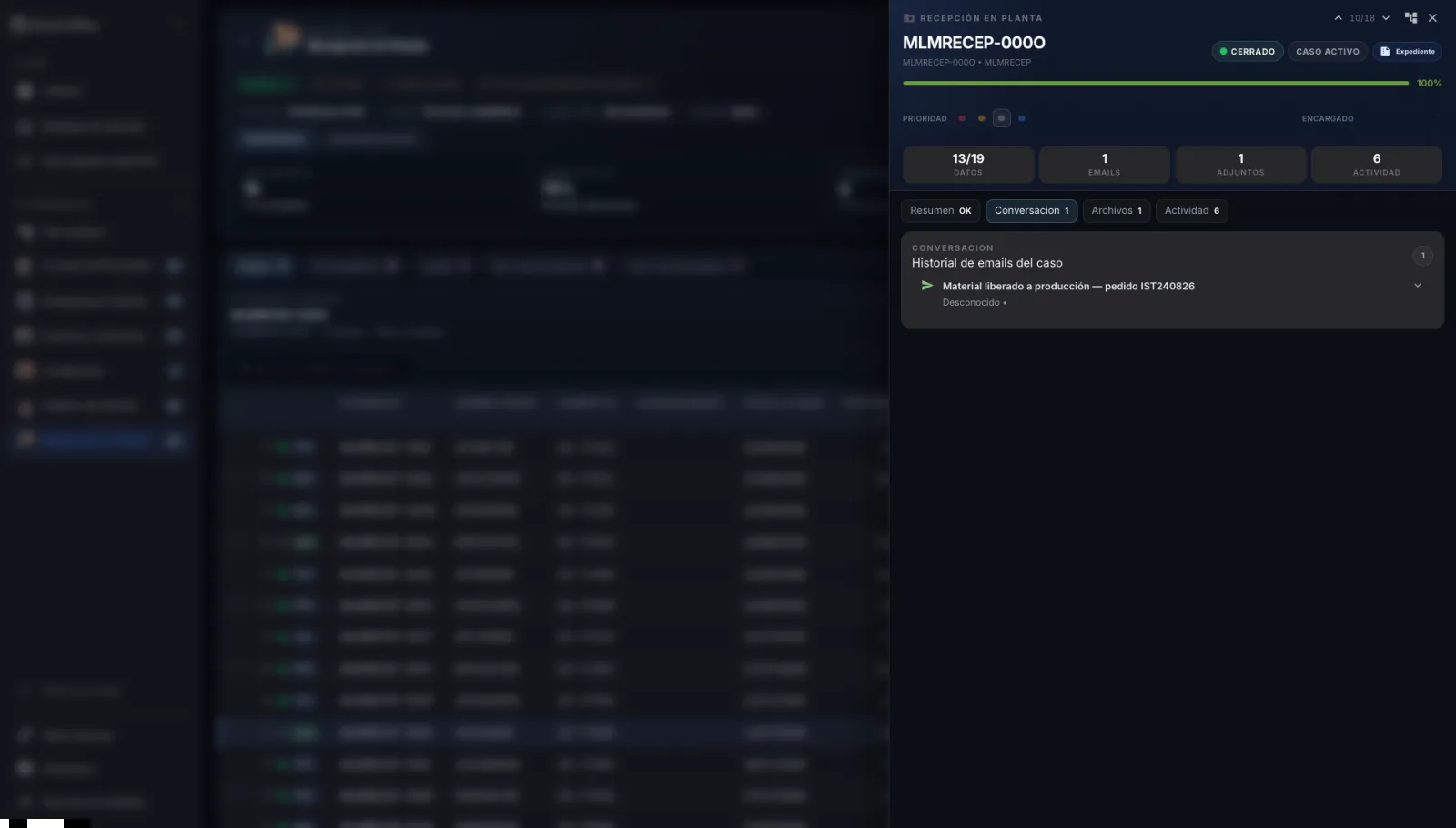
The e-mail to production somebody drafts by hand today — what arrived, which lot, which certificate — writes itself when the case file closes.
The wake-up calls
They chase the supplier for the certificate, the carrier for the delivery note, the customer for the payment complement. Once a day, until it arrives.
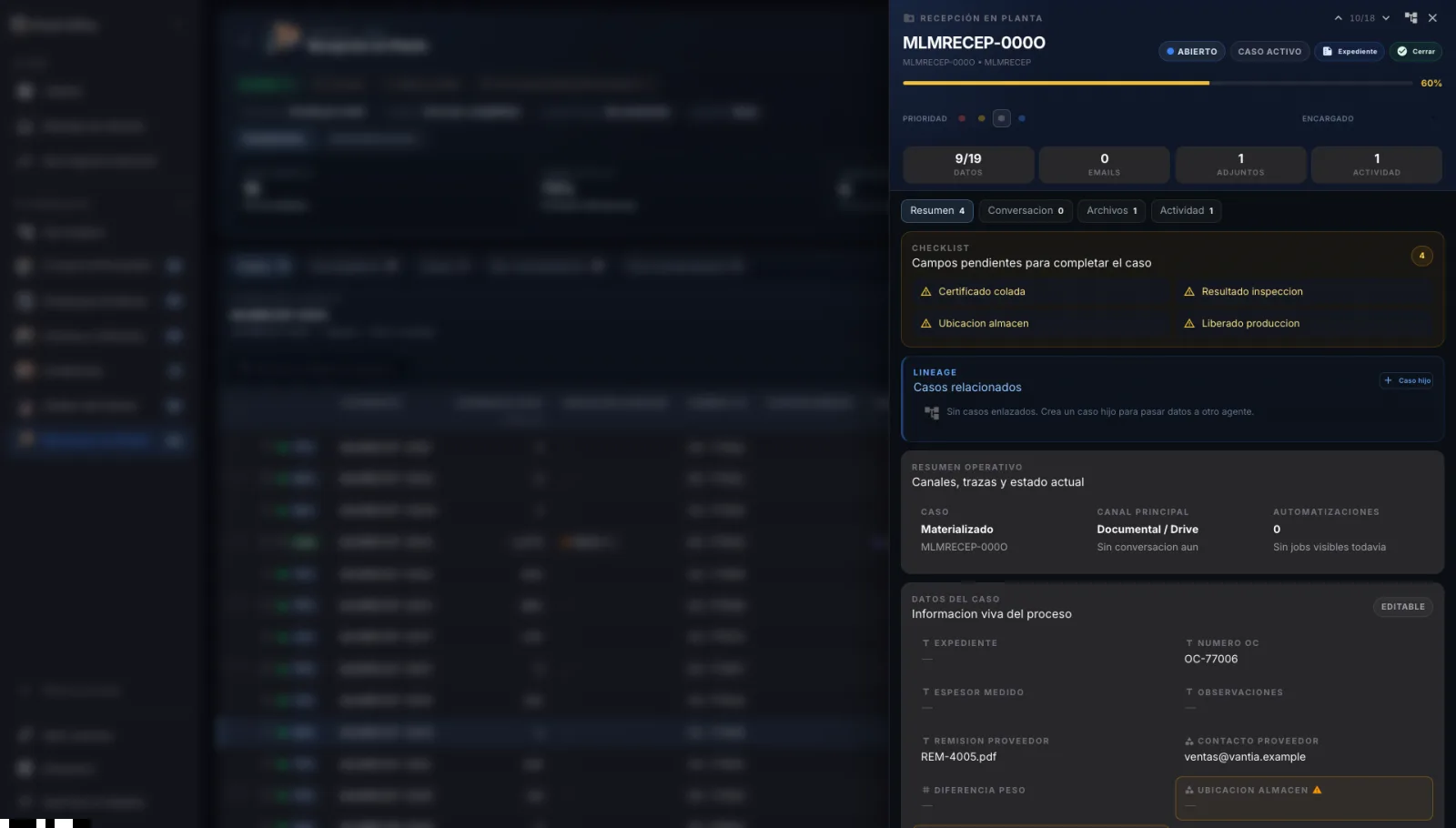
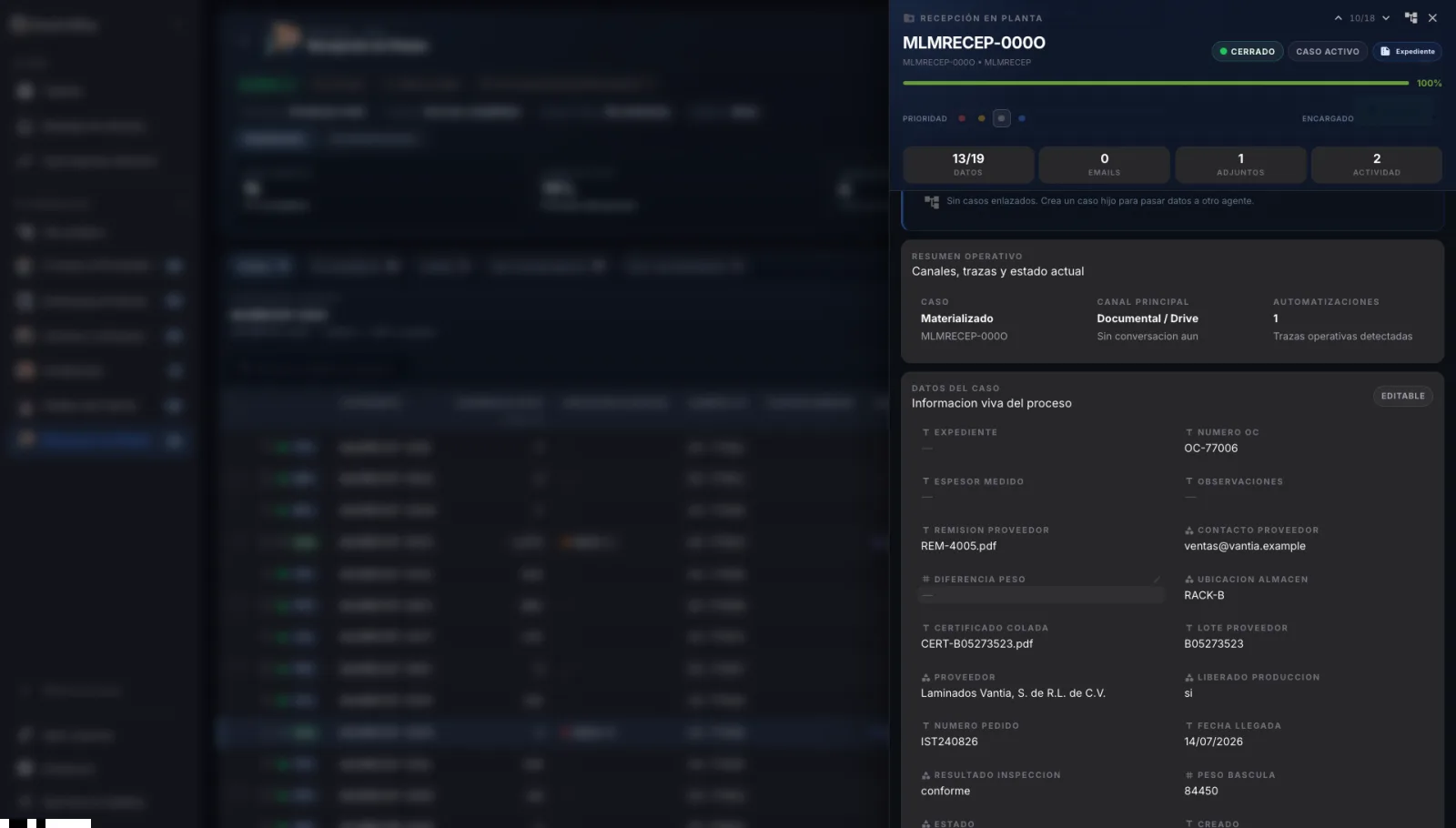
From tutorial GO-004 · the handoff to production: the e-mail that writes itself
01 · Four fields missing
02 · The data arrives and it closes itself
03 · The e-mail to production, written by itself
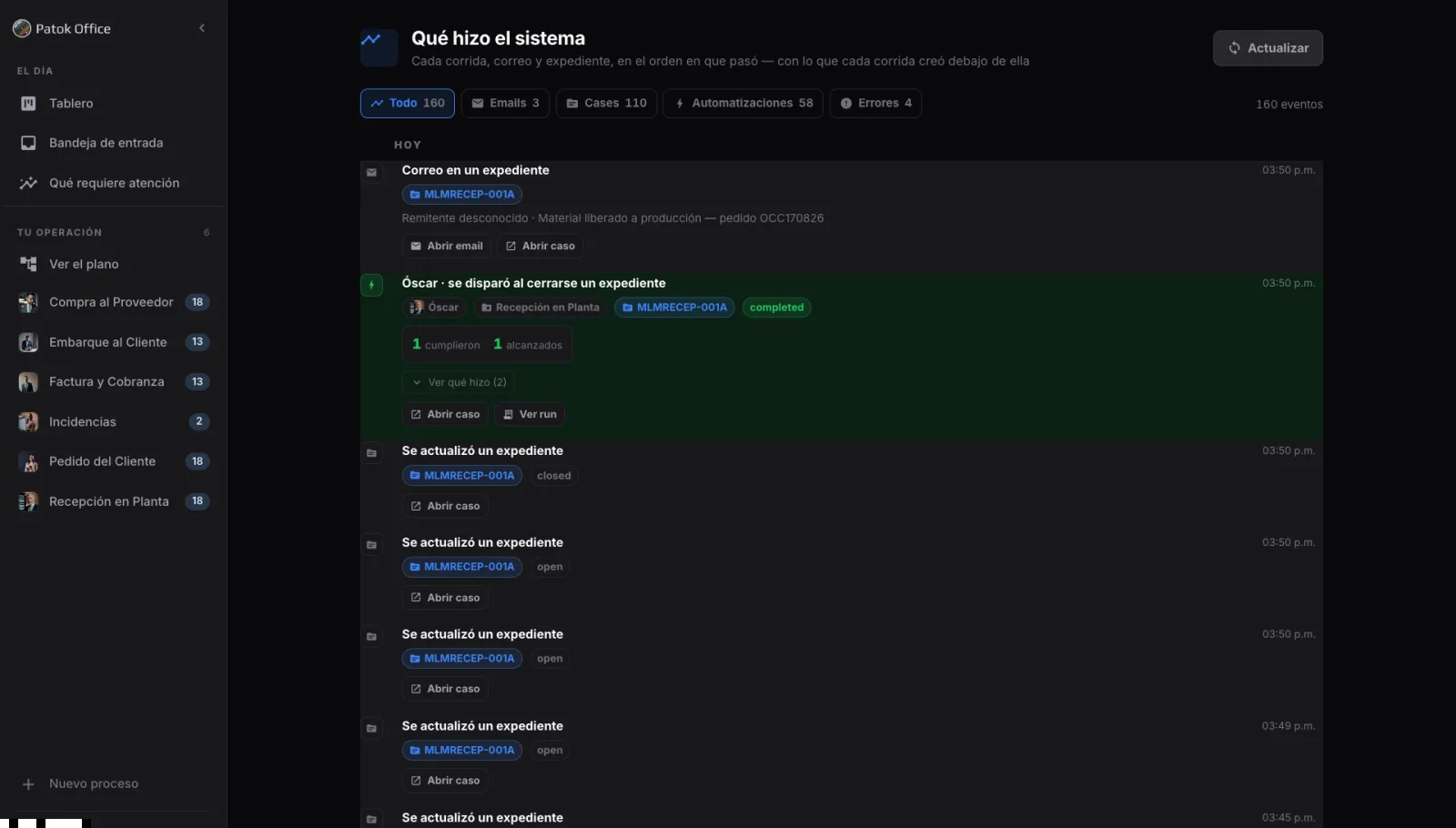
What the system did
160 events. 4 errors. In plain sight.
Every run, e-mail and case file, in the order it happened — with what each run created underneath it.
- The e-mail that landed in a case file, with sender and subject.
- The automation that fired when a case file closed: how many matched, how many it reached.
- Every state change — open, closed — in the order it happened.
- Errors have their own tab. They are not filtered out; they are counted.
A system that pushes on its own has to be auditable on its own. Otherwise nobody lets it run.
One agent, three voices
Stays quiet · Only asks · Converses
Each station has an agent, and the agent has a voice. You decide how much of it.
Receives, extracts, files. Writes to nobody. For stations where the e-mail already arrives complete, or where nobody wants a robot answering.
Writes only to ask for what is missing: the certificate, the delivery note, the payment complement. And follows up again the next day.
Answers questions about the case file. For incidents, where the customer asks and expects an answer.
It answers on the channel it was written on: e-mail if it was e-mail, WhatsApp if it was WhatsApp.
Contacts are not leads. They are actors in a process — the receiver, accounts payable, the carrier — and they get written to because they have a role, not because they are on a list.
The team
The faces of your operation.
You are not hiring six bots. It is one agent for your organisation with a face and a voice per station: some stay quiet and only file, others ask for the field that is missing, and one converses. Each face has its own job and its own account, and you see it every day on the map.
-

Customer Order
Catalina
Stays quiet
16 active
6 required of 13 fields · 1 transition · 1 push
-

Purchase to Supplier
Carlos
Only asks
10 active
9 required of 15 fields · 1 transition
-
Plant Receiving
Óscar
Only asks
18 case files · 15 incomplete · 74%
10 required of 15 fields · 2 pushes
-

Shipment to Customer
Sergio
Only asks
6 active
10 required of 17 fields · 1 transition · 1 push
-

Invoice and Collections
Iván
Only asks
11 active
8 required of 13 fields · 1 push
-

Incidents
Paula
Converses
2 active
6 required of 14 fields · 1 push
None of them invents a field: they ask for the missing one from whoever owes it, and write it into the case file.
Same doctrine, different terrain
What Gemba does on the floor, Office does with the paperwork.
Nobody else brings plant physics to the office. Others show an agent doing tasks; we show the flow system.
WIP, completeness, transitions and pushes. The same instrumentation, the same vocabulary. A planner who reads the Gemba board reads this one without anyone explaining it.
See Patok Gemba →Integration
Your ERP stays untouched. It does not even notice.
Any ERP knows how to e-mail a CSV. That is enough to give birth to the case files. No API, no connector, no IT project.
What you have to provide
- 1A sample file from your ERP: the headers become the fields, with no mapping screen.
- 2Telling us which column is the reference. That is the only required decision.
- 3One mailbox per station. Your suppliers keep writing e-mails, same as always.
The file only governs the case files it created itself. What somebody did by hand is never overwritten; what disappears is flagged, not deleted.
Who it is for
Companies where the product moves fast and the paperwork gets stuck.
Steel distributors
Hundreds of small orders, each with its heat certificate. The WIP is not in the warehouse: it is in the e-mail that never arrived.
Service centers
Cutting, slitting, toll processing. A customer’s material comes in and has to leave with paperwork. In between the two, the office.
Industrial traders
You buy from a supplier, you sell to a customer, and you never touch the product. Your whole business is the case file.
Manufacturing SMEs
One person runs purchasing, receiving and invoicing at the same time. It is not willingness they lack: it is a system that pushes.
Who is telling you this
I have stood on the floor when the machine stops and nobody knows whether the material was released. It is not that people do not care: the data sits in somebody else's inbox and everyone chases it on their own.
With Patok I take production control software to plants all over Mexico. Before that I did a doctorate in manufacturing engineering in Europe, with research for Airbus and for Rolls-Royce.
How you start
One station first.
You map your chains with me
Half an hour: what happens before going down to the floor, what happens after leaving it, and where it gets stuck on you. Out comes your map.
You connect the e-mail or the CSV
A mailbox for the station and the export from your ERP. Your case files are born on their own.
You start with the one that hurts most
Receiving, shipping or collections: you choose. It runs a week on real e-mails. If that worked, the next one follows.
Nothing to install. Not at your company and not at your suppliers'.
FAQ
What everybody asks.
Do I have to change my ERP?
No. Your ERP stays untouched and does not even notice. It e-mails a CSV — every ERP knows how — and the case files are born from it. No API, no connector, no IT project. The file only governs the case files it created itself: what somebody did by hand is never overwritten.
Do my suppliers have to log into a portal?
No. Your suppliers and your customers keep writing e-mails, same as always. There is no account to create and nothing to install, not at your company and not at theirs. The agent reads what arrives, attaches it to the open case file and asks for what is missing.
How long until it is running?
Half an hour to map your chains; that is where the map comes from. Then one single station — the one that hurts most — starts on real e-mails and runs for a week. If that worked, the next one follows. There is no months-long rollout because there is nothing to roll out.
Does it work with WhatsApp?
Yes. The agent answers on the channel it was written on: e-mail if it was e-mail, WhatsApp if it was WhatsApp. Most people never open the application — only two or three people see the map, the board and the automations; everybody else lives with the system from their inbox or their phone.
What is at stake
Two ways to close the month.
If nothing changes
- The line stops over a piece of paper.
- Somebody chases the certificate on WhatsApp.
- The payment sits waiting on the missing document.
- Nobody knows how many case files are open.
When the system pushes
- The e-mail to production writes itself.
- The certificate arrives because somebody asked for it every single day.
- You close the month without chasing.
- You know how many case files there are and where they are.
The map, on one page
Count the WIP of your office.
We send you the map as a PDF: the three chains, the six stations and what gets measured at each one. Plus the Office tutorials as they come out.
- The one-page office map, as a PDF.
- The Patok Office tutorials as they come out.
- No spam. One click to leave.
Send me the map
We send you the map as a PDF: the three chains, the six stations and what gets measured at each one. Plus the Office tutorials as they come out.
Done. The map is already on its way. Look for it in your inbox: it comes from me, Horacio. After that, the Office tutorials as they come out.